
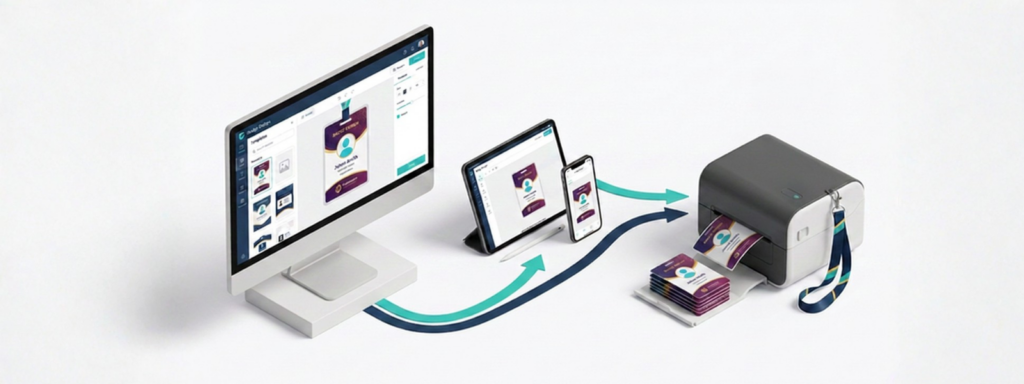
Pre-Print or Print Onsite? Choosing the Right Event Badge Printing Option
Badge printing is one of those event logistics details that seems simple until you’re staring down a registration line with a stack of name badges and 20 minutes before doors open. The good news: there’s no single “right” way to handle event badge printing. Apps4Org supports two proven approaches, and the best choice depends on your event size, budget, and how much control you want over the check-in experience.
Here’s a look at both options — pre-printing badges ahead of the event, or printing onsite with Zebra printers and iPads — so you can decide which fits your next event.
Option 1: Pre-Generate and Print Badges Before the Event
It’s cost-effective
You get design flexibility with Avery labels
You skip the onsite printing hassle entirely
Because badges are ready before attendees ever walk through the door, there’s no printer setup, no paper jams, and no last-minute troubleshooting at registration. Your onsite team can focus on greeting attendees instead of managing hardware.
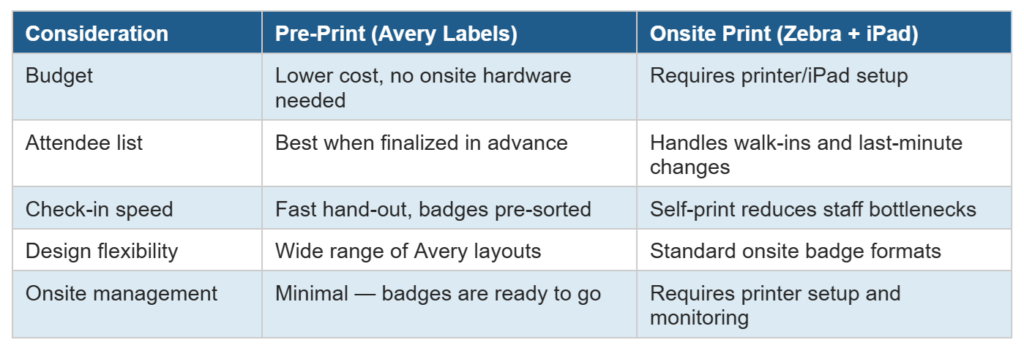
Pre-printing works especially well for events with a finalized attendee list, predictable registration counts, and a check-in process built around speed and simplicity.
Option 2: Print Onsite with Zebra Printers, iPads, and Apps4Org Onsite Software
It’s built for flexibility
There’s no badge to pre-manage
Since badges print on demand, event planners don’t need to sort, alphabetize, or safeguard boxes of pre-printed badges before the event. If a name is misspelled, a title changes, or someone registers the morning of the event, the system handles it without any extra prep work.
Onsite printing is a strong fit for events with fluctuating attendance, complex or last-minute registration changes, or a self-service check-in experience that reduces bottlenecks at the door.
Which Option Is Right for Your Event?
Streamline Your Next Check-In with Apps4Org
Whether you’re pre-printing with Avery labels or letting attendees self-print onsite with Zebra printers and iPads, Apps4Org’s event technology platform is built to make badge printing — and the entire check-in process — faster and easier to manage.
Ready to see which badge printing option works best for your next event? Contact the Apps4Org team to schedule a demo and find the right fit for your registration workflow.