
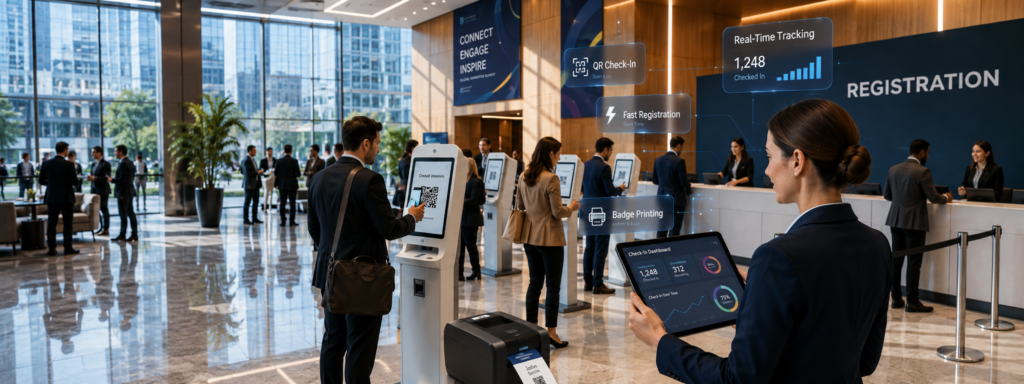
If you’ve ever managed conference check-in, you know the feeling: the doors open, a line snakes through the lobby, and frustrated attendees are already checking their watches before the first session begins. Long check-in queues are one of the most common complaints event planners receive — and one of the most preventable. Conference check-in software has transformed what used to be a logistical headache into a smooth, welcoming first impression.
This guide breaks down the most effective strategies for speeding up check-in at your next event, from technology upgrades to smart staffing and layout decisions
Why Check-In Bottlenecks Happen
Before fixing the problem, it helps to understand why lines form in the first place. The most common culprits are:
- Manual lookup processes — staff searching spreadsheets or printed lists slow everything down
- Single check-in points — one table for 500 attendees is always going to be a bottleneck
- Badge printing delays — printing each badge on demand at check-in adds 30–60 seconds per person
- Late registrations — walk-ins and day-of registrants require extra handling
- Uneven arrival patterns — everyone arriving in the same 20-minute window overwhelms any setup
Understanding where your specific bottleneck lies will help you choose the right solution.
Technology Solutions That Actually Work
QR Code Check-In
QR codes are one of the fastest ways to move people through a check-in line. When attendees register, they receive a unique QR code via email (or in your conference app). At the event, staff or kiosks scan the code in seconds.
The benefits are significant:
- Check-in time drops from 45–90 seconds per person to under 10 seconds
- No manual name lookup required
- Works offline if your software supports it — important in venues with spotty Wi-Fi
The key is making sure attendees actually have their QR code accessible. Encourage them to add it to their phone’s wallet app or download the conference app before arriving.
Self-Check-In Kiosks
Self-service kiosks let attendees check themselves in without waiting for a staff member. They scan their QR code, confirm their details, and pick up a pre-printed badge or print one on the spot.
Kiosks work especially well for:
- Large conferences with 500+ attendees
- Events with predictable peak arrival times
- Tech-forward audiences who prefer low-friction self-service
A well-deployed kiosk station can process 3–4 times more attendees per minute than a staffed table.
Pre-Event Check-In
Some conference platforms allow attendees to “check in” digitally before the event — confirming attendance, selecting sessions, and even downloading their badge in advance. On event day, pre-checked-in attendees can go straight to a fast lane for badge pickup.
This approach also gives you valuable data: you know in advance who is definitely coming, helping with session capacity planning and catering.
Onsite Badge Printing
Pre-printing badges alphabetically and stuffing them in folders is old-fashioned and error-prone. Onsite badge printing — where badges are printed on demand at the moment of check-in — eliminates the need to sort through hundreds of pre-printed badges. It also handles last-minute changes, name updates, and walk-ins without any extra effort.
Pair on-demand badge printing with QR code scanning and you have a system that is both fast and flexible.
Staffing and Layout Tips
Technology alone will not eliminate lines if your physical setup creates friction. Here are practical layout recommendations:
Spread out your check-in points. A single check-in desk is always a bottleneck. Plan for one check-in station per 75–100 expected arrivals during your peak window.
Create separate lanes. At minimum, have one lane for pre-registered attendees and one for walk-ins or special cases (VIPs, speakers, exhibitors). Consider alphabetical lanes (A–M, N–Z) for very large events.
Position staff strategically. Put your fastest, most confident staff members on the floor helping attendees find their QR codes and navigate to the right station — not stuck behind a table. The goal is to keep the line moving, not just process people at the front.
Run a dry-run the day before. Set up your equipment, test your check-in software, and time how long it takes to process a simulated attendee. Identify any technical or layout issues before the crowd arrives.
Communicate arrival windows. In your pre-event emails, suggest staggered arrival times by last name or registration group. This smooths out peak demand and prevents everyone showing up at once.
How Conference Check-In Software Ties It All Together
Managing QR codes, kiosks, badge printing, and real-time attendance data is only practical with the right platform behind it. Conference check-in software centralizes your registration data, syncs with your attendee list in real time, and gives your team a live dashboard showing who has arrived.
Look for a solution that:
- Integrates check-in with your event app so attendees have everything in one place
- Supports offline check-in in case of connectivity issues
- Provides real-time reporting so you can see check-in rates and identify stragglers
- Handles badge printing, QR scanning, and walk-in registration from a single interface
When everything talks to each other, your team spends less time troubleshooting and more time welcoming attendees.
Make Check-In the Start of a Great Experience
A fast, frictionless check-in sets the tone for your entire event. When attendees walk in, scan a code, grab their badge, and head straight to the opening session — that efficiency signals that the whole event will be well-run. The opposite is also true: a chaotic check-in creates anxiety and erodes trust before the first keynote begins.
The good news is that the tools to fix this problem are accessible, affordable, and easier to implement than most planners expect.
Ready to streamline your conference check-in? Apps4Org’s conference app includes built-in QR code check-in, onsite badge printing, and real-time attendance tracking — all in one platform. See how it works .