
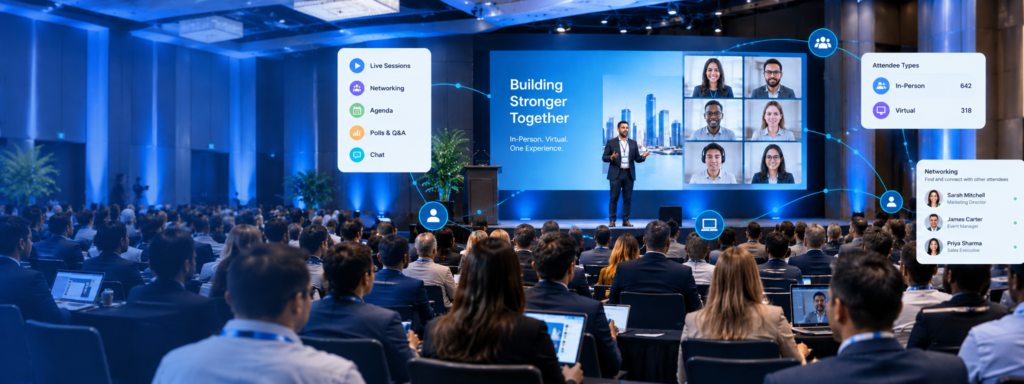
If you’ve planned a conference in the last few years, you already know: hybrid is no longer a backup plan. It’s a strategy. And while the format opens your event to a much larger audience, it also introduces a challenge that catches many planners off guard — managing two completely different attendee experiences at the same time.
A purpose-built hybrid conference app is the operational backbone that makes it work. Here’s what that looks like in practice.
Why Hybrid Events Are Here to Stay
The shift to hybrid didn’t start with necessity — it accelerated because of it. But even as in-person events fully rebounded, organizations discovered something valuable: virtual participation expands reach without proportionally expanding cost.
A speaker who can’t travel can still keynote. An attendee in another country can still network. A sponsor can still generate leads from a virtual booth. The economics are compelling, and attendees have come to expect the option.
Hybrid isn’t a compromise. When it’s run well, it’s an upgrade.
The Core Challenge: Experience Equity
The hardest part of hybrid isn’t logistics — it’s equality. In-person attendees get the energy of the room, the hallway conversations, the spontaneous connections. Virtual attendees, left to a passive livestream, often feel like observers rather than participants.
The goal of experience equity means asking: What can a virtual attendee do that an in-person attendee can do?
- Can they see the full agenda and build their schedule?
- Can they ask questions during a session?
- Can they connect with other attendees?
- Can they discover and engage with sponsors?
If the answer to any of these is “no,” there’s a gap — and gaps lead to drop-off.
How a Hybrid Conference App Bridges the Gap
A well-designed hybrid conference app doesn’t just serve two audiences in parallel. It creates a shared event environment where in-person and virtual attendees operate in the same space, just from different locations.
Shared Agenda and Personal Scheduling
Both audiences should see the same session catalog, with the ability to browse, favorite, and build a personal schedule. When sessions change or rooms shift, push notifications keep everyone informed — regardless of whether they’re on-site or at home.
Live Session Streaming
Integrated streaming within the app keeps virtual attendees in the experience rather than bouncing between a conference app and a separate video platform. Lower friction means higher retention.
Real-Time Q&A and Polling
This is where many hybrid setups fall short. When Q&A is handled with a physical microphone, virtual attendees are invisible. An in-app Q&A tool lets all attendees submit questions from their phones or laptops, with moderators selecting the best — no one gets left out based on geography.
Live polling works the same way: one question, every attendee responds, results appear on screen in real time.
Virtual Networking
Networking is consistently ranked as a top reason people attend conferences. Don’t let virtual attendees miss it. Attendee profiles, in-app messaging, and meeting scheduling tools allow virtual and in-person participants to connect before, during, and after the event.
Tips for Keeping Virtual Attendees Engaged
Virtual attendees need more intentional design to stay engaged. A few practices that work:
- Schedule virtual-first moments. Open the day with a welcome message addressed directly to virtual attendees. Acknowledge that they’re part of the event.
- Use polls and Q&A in every session. Passive viewing leads to multitasking. Interaction keeps people present.
- Assign a virtual host or moderator. Someone whose job it is to monitor the virtual feed, surface questions, and narrate what’s happening in the room goes a long way.
- Create virtual networking sessions. Dedicated time for virtual-only or mixed networking prevents it from feeling like an afterthought.
- Send mid-event push notifications. Reminders, highlights, and “don’t miss this” alerts re-engage attendees who may have stepped away.
Managing Two Audiences: Logistics That Can’t Break
Running hybrid means running parallel operations. Some things to get right on the logistics side:
- Check-in flows: In-person attendees need badge pickup and QR code check-in. Virtual attendees need login credentials and a clear way to access the streaming platform. Both should be handled before day one.
- Room setup: Cameras need to capture speakers and slides clearly. Audio quality for the stream is non-negotiable — bad audio is the fastest way to lose virtual attendees.
- Staff coverage: Assign a dedicated team member to monitor the virtual experience throughout the event. They’re your eyes and ears for the audience you can’t see in the room.
Using Reporting to Understand Both Audiences
One of the underrated advantages of a hybrid conference app is the data. You can see:
- Which sessions had the highest virtual attendance vs. in-person attendance
- Where virtual drop-off occurred (and at what point in a session)
- Which networking connections were made — and between in-person and virtual attendees
- Sponsor engagement by audience type
This data doesn’t just help you report outcomes — it helps you design a better event next year.
Ready to Run Your Next Hybrid Conference With Confidence?
Managing in-person and virtual attendees doesn’t have to mean double the complexity. With the right hybrid conference app, you can deliver a unified, engaging experience for every attendee — wherever they are.
Apps4Org is built for exactly this. Our conference app supports full hybrid event management, from live streaming and in-app Q&A to virtual networking and real-time reporting.